Mobile Game GUI Pack 08 for 2D Designers
Streamline Your 2D Mobile Game Interface with Customizable Elements
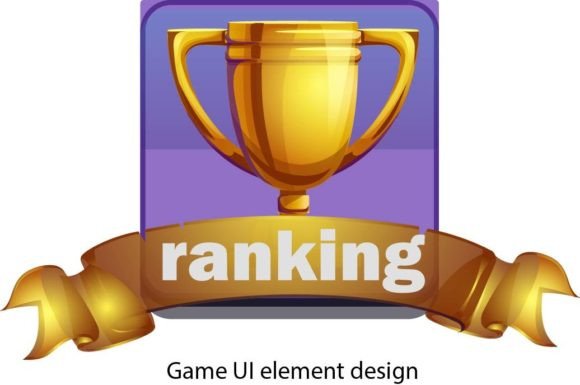
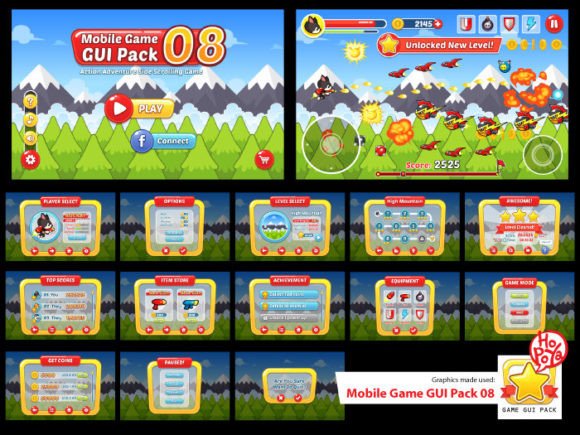
Creating a visually appealing and functional user interface is one of the most critical steps in developing a successful 2D mobile game. Mobile Game GUI Pack 08 offers a robust collection of design assets that help creators build polished interfaces quickly and efficiently. Whether you're an indie developer, UI/UX designer, or a small studio looking to streamline your workflow, this GUI pack provides a flexible foundation for your mobile game projects.
What’s Included in Mobile Game GUI Pack 08?
This pack includes a variety of assets designed for adaptability and ease of use:
- 40 customizable buttons in five distinct color options
- Customizable windows and game interface elements for menus, HUDs, and pause screens
- Vector AI and EPS10 files for scalable graphics
- Transparent PNG files for immediate use in game engines
- The PoetsenOne font, a modern and readable typeface ideal for game UI
These components are crafted to be easily integrated into various game development environments, from Unity to Godot and beyond.
Why Mobile Game GUI Pack 08 Stands Out
Many UI packs offer a static design language, but Mobile Game GUI Pack 08 is built with customization in mind. Its modular components allow developers to mix and match elements to suit different game genres and visual styles. The inclusion of vector files means you can scale assets to any resolution without quality loss, while the transparent PNGs are ready to drop into your project without extra prep work.
Additionally, the PoetsenOne font included in the pack is a subtle but powerful design choice. It’s clean, legible at small sizes, and has a slightly modern edge that works across genres—from casual puzzle games to intense action titles.
Creative Possibilities and Design Flexibility
One of the strongest features of this GUI pack is its adaptability. Here are a few creative directions you can explore:
- Genre-specific skins: Use the base elements to create themed interfaces for different types of games—retro, sci-fi, fantasy, or minimalist.
- Dynamic UI scaling: Leverage the vector files to create responsive UI that adjusts seamlessly across devices and screen sizes.
- Color variations: With five base color options for buttons and windows, you can easily match the UI to your game’s art style or brand palette.
- Animated transitions: Combine the PNG assets with animation tools to create smooth transitions between game states like menus, levels, and settings screens.
Designers can also layer and recolor the assets to create unique interface styles without starting from scratch, saving time and maintaining visual consistency.
Applications Across Different User Types
Whether you're a solo developer or part of a larger team, Mobile Game GUI Pack 08 can be tailored to your needs:
- Indie developers: Save time by using pre-built UI elements that are easy to customize and integrate into your game engine.
- UI/UX designers: Use the vector files to refine and adapt the interface to match your design system or brand guidelines.
- Small studios: Standardize your UI across multiple games using the same base elements, ensuring a cohesive look and feel.
- Freelancers: Offer polished UI design services to clients using this pack as a foundation for custom interfaces.
- Educators: Introduce students to professional UI design workflows by incorporating this pack into game development courses.
This versatility makes Mobile Game GUI Pack 08 a valuable asset for anyone involved in mobile game development, regardless of experience level or project scope.
How to Use This Pack Effectively
To get the most out of Mobile Game GUI Pack 08, consider the following best practices:
- Start with a style guide: Define your game’s visual tone early and use the pack’s color and layout options to build a consistent UI.
- Organize your assets: Keep your UI elements well-structured in your project to streamline updates and future redesigns.
- Test across devices: Use the vector files to ensure your UI scales well on different screen sizes and resolutions.
- Iterate and refine: Don’t be afraid to tweak colors, fonts, and layouts as your game evolves.
By combining the flexibility of the pack with thoughtful design choices, you can create a user interface that enhances gameplay and keeps players engaged.
Real-World Examples and Use Cases
Here are a few practical examples of how you might apply Mobile Game GUI Pack 08 in real projects:
- Casual mobile puzzle game: Use the lighter color variants and clean fonts to create a relaxing, uncluttered interface.
- Action-adventure title: Combine dark UI elements with glowing accents to match a dramatic, high-energy game aesthetic.
- Strategy game: Organize complex menus and HUDs using customizable window frames and panel layouts.
- Multiplayer mobile game: Implement consistent button styles and feedback animations to improve usability during fast-paced interactions.
Each of these scenarios shows how the same base assets can be adapted to fit different gameplay experiences and target audiences.
Final Thoughts and Next Steps
Mobile Game GUI Pack 08 is more than just a set of UI graphics—it’s a toolkit for creating professional, adaptable interfaces that enhance the player experience. Whether you're building your first game or your tenth, this pack offers a solid foundation to work from, saving time and reducing development friction.
If you've used Mobile Game GUI Pack 08 in your project, consider sharing your results or leaving a review. Your insights can help other creators make informed decisions and spark new ideas for how this pack can be used creatively.
Thank you for exploring this UI pack. Rate and comment to help others discover its potential!